
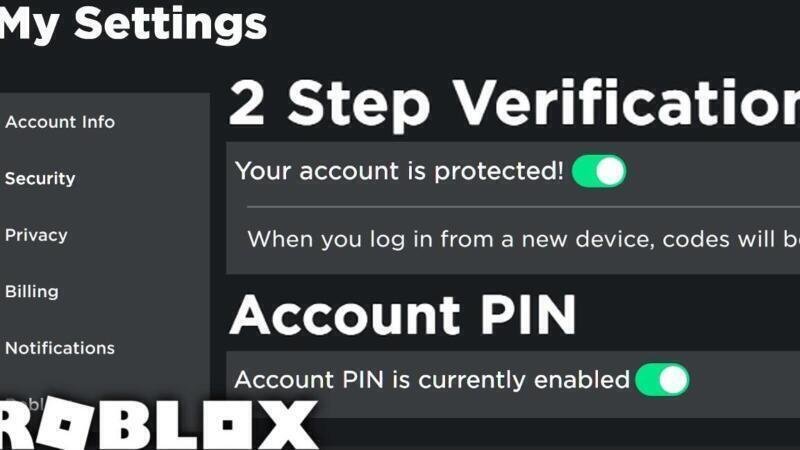
Ensuring the safety of your online accounts is more important than ever, especially in gaming platforms like Roblox where millions of users engage daily. With the rise of cyber threats, knowing How to Secure Your Roblox Account to Prevent Hacking has become essential for players of all ages. Unauthorized access can lead to loss of virtual items, personal data exposure, and compromised credentials. This guide provides practical, easy-to-follow steps to enhance your account’s security, from enabling two-factor authentication to recognizing phishing scams. By implementing these strategies, you can enjoy a safer gaming experience and protect your Roblox profile from potential breaches. Stay informed, stay protected.
Essential Steps to Protect Your Roblox Experience Online
Roblox is one of the most popular online gaming platforms, especially among younger users. With its interactive environment and user-generated content, it provides endless entertainment. However, this popularity also makes it a target for cyber threats. Understanding how to secure your Roblox account to prevent hacking is crucial to ensuring a safe and enjoyable experience. This guide outlines actionable strategies to strengthen your account’s security and keep your personal information protected.
Enable Two-Factor Authentication (2FA) for Maximum Protection
One of the most effective ways to safeguard your Roblox account is by enabling Two-Factor Authentication (2FA). This security feature adds an extra layer of identity verification beyond just a password. When 2FA is active, you must provide a second form of identification—usually a code sent to your email or generated by an authenticator app—whenever logging in from a new device. This drastically reduces the risk of unauthorized access, even if your password is compromised. To enable 2FA on Roblox, go to your Account Settings, select Security, and follow the prompts to set it up using either an authenticator app or email verification.
Create a Strong, Unique Password to Resist Brute Force Attacks
A strong password is your first line of defense against hacking attempts. When learning how to secure your Roblox account to prevent hacking, always ensure your password is long, complex, and unique. Avoid using easily guessable information like birthdays, names, or common words. Instead, use a combination of uppercase and lowercase letters, numbers, and special characters. Never reuse passwords across different platforms, as a breach on another service could expose your Roblox credentials. Consider using a reputable password manager to generate and store complex passwords securely.
Avoid Phishing Scams and Fake Roblox Login Pages
Phishing is a common tactic used by hackers to steal login information. They create fake Roblox login pages or send deceptive emails that appear legitimate, tricking users into entering their credentials. To defend against this, always access Roblox through the official website (www.roblox.com) or the official app. Never click on links in unsolicited messages or forums that promise free Robux or account upgrades. Verify the URL in your browser’s address bar to ensure it starts with https:// and ends with roblox.com. Educating yourself about phishing threats is a key component of how to secure your Roblox account to prevent hacking.
Keep Personal Information Private and Limit Account Sharing
Sharing your Roblox account details—even with friends—increases the risk of misuse or exposure. Similarly, disclosing personal information such as your real name, location, or school in your profile or chat conversations can make you vulnerable to social engineering attacks. Always set your account privacy settings to restrict who can message you, join your games, or view your friend list. Use a username that doesn’t reveal your identity, and never share your password with anyone. Maintaining privacy is an essential step in how to secure your Roblox account to prevent hacking.
Regularly Monitor Account Activity and Login History
Staying proactive about your account’s security means regularly checking your login history and being alert to any suspicious activity. While Roblox doesn’t provide a built-in login history feature for all users, you can monitor changes to your account settings, password, or email address as indirect indicators of unauthorized access. If you notice unfamiliar activity, such as altered personal details or unexpected purchases, change your password immediately and enable 2FA if not already active. Frequent monitoring helps detect breaches early and plays a vital role in how to secure your Roblox account to prevent hacking.
| Security Measure | Description | Benefit |
|---|---|---|
| Two-Factor Authentication (2FA) | Requires a second verification step beyond the password. | Blocks unauthorized access even if the password is stolen. |
| Strong Password | Uses complex combinations of letters, numbers, and symbols. | Resists brute force and dictionary attacks. |
| Phishing Awareness | Avoids fake websites and deceptive messages. | Prevents accidental credential disclosure. |
| Privacy Settings | Controls who can message or view your profile. | Reduces exposure to scams and harassment. |
| Account Monitoring | Regular checks for unauthorized changes. | Enables quick response to potential breaches. |
How to Secure Your Roblox Account to Prevent Hacking: A Comprehensive Security Guide
What steps can users take to ensure their Roblox account is protected against hacking attempts?
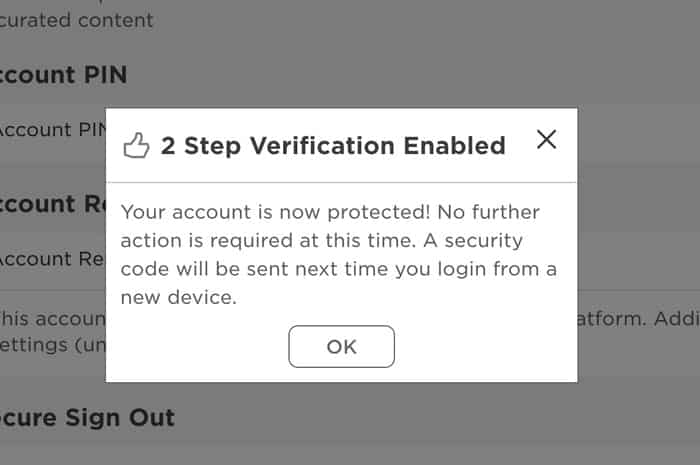
To ensure their Roblox account remains protected against hacking attempts, users should begin by creating a strong, unique password that combines uppercase and lowercase letters, numbers, and special characters, avoiding common phrases or personal information. Enabling two-factor authentication (2FA) significantly strengthens account security by requiring a second form of verification, such as a code from an authenticator app, making unauthorized access much more difficult. Users must also remain cautious of phishing scams—never share login credentials or click on suspicious links claiming to be from Roblox, as these are common tactics used by hackers. It is essential to keep the email associated with the Roblox account secure, as password resets depend on it, and regularly reviewing account activity and connected devices can help identify any unauthorized access early. Staying informed about safety practices and updating security settings promptly when needed contributes to overall protection. How to Secure Your Roblox Account to Prevent Hacking involves consistent vigilance and the application of multiple layered defenses.
Enable Two-Factor Authentication for Added Security
Enabling two-factor authentication (2FA) is one of the most effective measures users can take to protect their Roblox account. With 2FA, logging in requires not only the correct password but also a time-sensitive code generated by an authenticator app like Google Authenticator or Authy. This added layer ensures that even if a hacker obtains the password, they cannot access the account without the second verification step. Roblox supports authenticator apps for 2FA, which is more secure than SMS-based codes that can be intercepted. Once 2FA is enabled, users should store their backup codes in a safe place to regain access in case they lose their device. This proactive step dramatically reduces the risk of unauthorized entry.
Create a Strong and Unique Password
A strong password is the first line of defense against hacking attempts. Users should avoid predictable patterns such as password123 or names and birthdays, which are easily guessable. Instead, passwords should be at least eight characters long and include a mix of letters, numbers, and symbols. It is also crucial to use a different password for Roblox than for other online accounts, as reusing passwords increases the risk of multiple accounts being compromised in a data breach. Consider using a reputable password manager to generate and store complex passwords securely. Regularly updating the password and avoiding sharing it with anyone further enhances account safety. A robust password significantly contributes to How to Secure Your Roblox Account to Prevent Hacking.
Recognize and Avoid Phishing Scams
Phishing is a common method hackers use to steal login credentials by impersonating Roblox through fake websites, emails, or messages. Users must learn to identify these scams by checking the sender’s email address, looking for poor grammar, and avoiding links that redirect to non-official domains. Roblox will never ask for a password via email or direct message. Never enter account details on third-party sites that promise free Robux or account upgrades, as these are almost always fraudulent. Using bookmarks to access the official Roblox website (www.roblox.com) helps prevent accidental visits to spoofed pages. Educating oneself and younger users about these tactics is essential in How to Secure Your Roblox Account to Prevent Hacking.
| Security Measure | Description | Effectiveness |
|---|---|---|
| Two-Factor Authentication | Requires a password and a time-based code from an authenticator app. | High |
| Strong Password | Uses complexity and uniqueness to resist brute-force attacks. | High |
| Phishing Awareness | Recognizing fraudulent emails and websites that mimic Roblox. | Medium to High |
| Secure Email Account | Protects the recovery method tied to the Roblox account. | Medium |
What precautions should players follow to avoid falling victim to scams on Roblox?

Players should take several critical precautions to avoid falling victim to scams on Roblox, including never sharing their login credentials, being wary of offers that seem too good to be true—such as free Robux or rare items—and avoiding third-party websites that claim to offer account upgrades or giveaways. It is essential to enable two-factor authentication (2FA) to significantly increase account security, as this adds an extra verification step during login. Users should also refrain from clicking on suspicious links sent via private messages or external platforms, as these often lead to phishing sites designed to steal personal information. Always report suspicious users or scams using the official reporting tools within the Roblox app or website. Furthermore, ensuring that the account email is up to date and secured with a strong password helps prevent unauthorized access. How to Secure Your Roblox Account to Prevent Hacking involves consistent vigilance and using official Roblox features exclusively, rather than relying on unofficial generators or promo code sites, which are common scams.
Recognizing and Avoiding Phishing Attempts
Phishing is one of the most common tactics used by scammers on Roblox, where they create fake login pages or messages that mimic official Roblox communications to steal usernames and passwords. Players should only access their accounts through the official Roblox website or app and be cautious of any message—whether in-game or via email—that asks for personal information or directs them to a login page. Red flags include poor grammar, urgent warnings about account suspension, or promises of free in-game currency. To stay protected, always verify the URL when logging in—ensuring it begins with https://www.roblox.com—and never enter credentials after clicking a link from a message. Teaching younger players to recognize these signs is crucial, as they are often the primary targets of such scams.
Managing In-Game Interactions Safely
Safe interaction within Roblox games requires players to exercise caution when communicating with strangers. Scammers often pose as fellow players or moderators, offering gifts or exclusive access to premium features in exchange for login details or personal information. Users should avoid participating in any trade or giveaway that requires account access and instead use Roblox’s official moderation system to report suspicious behavior. Parents and guardians are encouraged to enable account restrictions and adjust privacy settings to limit chat functionality, especially for younger users. Additionally, playing on games with strong moderation and high user ratings can reduce exposure to scam attempts, fostering a safer and more enjoyable experience.
How to Secure Your Roblox Account to Prevent Hacking
Securing a Roblox account requires proactive steps to prevent unauthorized access and safeguard personal data. The most effective measure is enabling two-factor authentication (2FA), which requires a code from a trusted device or authenticator app during login, significantly reducing the risk of compromise. Users should also create a strong, unique password and avoid using the same credentials across multiple platforms. Activating email verification for account changes and keeping recovery options up to date ensures that users can regain access if something goes wrong. Below is a summary of key security practices:
| Security Measure | Description |
|---|---|
| Two-Factor Authentication (2FA) | Adds an extra layer of protection by requiring a time-sensitive code during login. |
| Strong Password | Use at least 8 characters with a mix of letters, numbers, and symbols; avoid reusing passwords. |
| Email Verification | Ensure the account is linked to a valid, secure email for recovery and alerts. |
| Privacy Settings | Limit who can message, friend, or trade with your account, especially for younger users. |
Frequently Asked Questions
How can I create a strong password for my Roblox account?
To protect your Roblox account, always use a strong password that combines uppercase and lowercase letters, numbers, and special characters. Avoid using easily guessable information like birthdays or common words, and never reuse passwords across different platforms. A unique password significantly reduces the risk of unauthorized access.
Why should I enable two-factor authentication (2FA) on Roblox?
Enabling two-factor authentication (2FA) adds an extra layer of security by requiring a second form of verification, such as a code from an authenticator app, in addition to your password. This helps prevent hackers from accessing your account even if they obtain your login credentials.
How do I avoid phishing scams targeting Roblox accounts?
To avoid phishing scams, never click on suspicious links sent via messages or emails claiming to be from Roblox. Always verify the sender’s authenticity and log in only through the official Roblox website or app. Never share your login information with anyone, even if the request appears legitimate.
What should I do if I suspect my Roblox account has been hacked?
If you believe your account has been compromised, immediately change your password and enable two-factor authentication if not already active. Report the incident to Roblox support and review your account’s recent activity for any unauthorized changes to your security settings or personal information.
